CommonSpirit - AR/GA/KY/TN/TX
- 4.2
- Rating
- 10.00K
- Installs
- Free
- Price

 Analysis by App-foxy
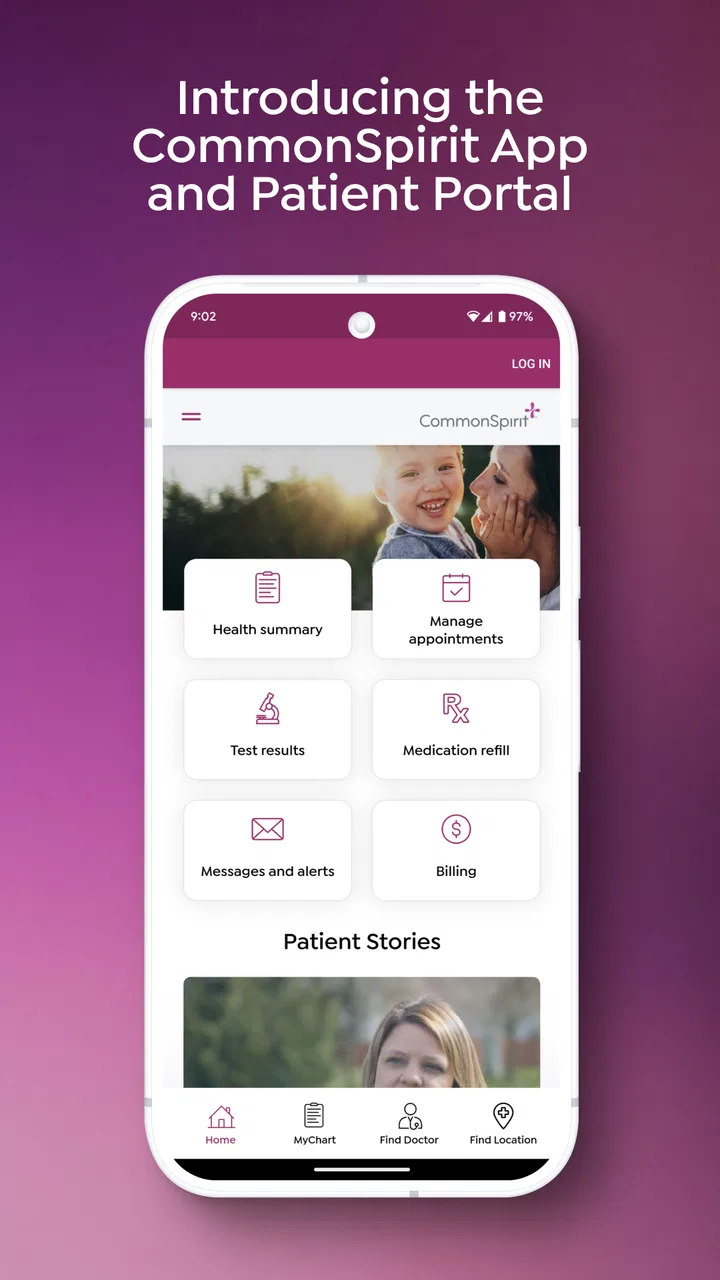
When I need to keep track of a health visit, the difficult part is often not the appointment itself. It is remembering where the details went afterward: a message in one place, visit information somewhere else, and health notes that I may want to check again when I am tired or in a hurry. CommonSpirit - AR/GA/KY/TN/TX is designed for that follow-up stage. I reviewed it as a medical app from CommonSpirit Health, and my impression is that its value comes from bringing recent health information, visit details, and messages into one secure place rather than trying to replace every health tool I already use.
CommonSpirit - AR/GA/KY/TN/TX is free and suitable for everyone, which makes it approachable for patients and family members helping with routine care. It has an average rating of 4.1 from around 200 ratings, with over 100 written reviews, and the app has passed 10K installs. Those figures suggest a useful but still fairly focused service: I would see it as a companion for people connected with the relevant CommonSpirit care network, not as a universal medical organizer for anyone.
From a health question to a clearer next step
The best way to understand this app is through a normal situation. Imagine I have just finished a clinic visit. I remember the broad advice, but later I want to check what happened, review a message, or prepare for the next conversation with a care team. Instead of relying on memory or searching through unrelated phone notifications, I open the app and begin with the information connected to that recent visit.
You May Also Like

 AccuWeather: Weather Radar
AccuWeather Review: A Quick, Clear Forecast for Everyday Decisions
For everyday plans, the best forecast is the one you can understand quickly. AccuWeather makes rain timing, radar, and local conditions easy to act on, with a few trade-offs.

 Hill Climb Racing
Why Hill Climb Racing Still Turns Crashes Into One More Run
A tiny car, a bumpy hill and one more upgrade: Hill Climb Racing keeps resurfacing because its simple chaos makes every near-miss feel personal.

 AliExpress - Shopping App
AliExpress Makes Global Shopping Feel Personal, but Shoppers Bear the Risk
AliExpress turns a global marketplace into a pocket-sized discovery engine. Its reach is useful, its shopping loop compelling, and its trade-offs easy to miss.

 Lords Mobile: Kingdom Wars
Lords Mobile Is a Kingdom-Building Routine, Not a Quick Match
A case-by-case verdict on the building, battles, device demands, and social commitments that make Lords Mobile rewarding for some players and exhausting for others.

 PDF Scanner app - TapScanner
TapScanner Makes Paperwork Easier to Capture, Check, and Share
TapScanner makes scanning with a phone feel less like a rescue operation and more like a dependable step in getting work done. Its capture tools are useful, though not flawless.

 Block Blast!
 Shows How Much a Puzzle Game Can Leave Out
A quiet grid game shows why puzzle players increasingly value instant clarity, repeatable skill and low-pressure play—and where the genre still needs to catch up.
More From Our News Desk
View All News


That starting point matters because medical information is most useful when it appears at the moment I need it. A general notes app can hold text I type myself, while a messaging app can preserve a conversation, but neither one naturally connects the conversation with the surrounding visit context. The CommonSpirit app is more purposeful: I approach it expecting to find care-related information rather than build a personal database from scratch.
I also like the distinction between recent information and a complete lifelong record. The app’s focus feels practical for the immediate period around care: what happened recently, what was communicated, and what I need to remember before the next step. That keeps the experience less intimidating than a large archive, although it also means I would not treat it as my only place for every medical document or emergency detail.
The first check before relying on it
My first recommendation is to confirm that the app matches the CommonSpirit service involved in your care and that you are using the correct account details. This is not a glamorous tip, but it prevents a common frustration with health apps: opening the right-looking application and then wondering why the expected information is not visible. The name includes AR, GA, KY, TN, and TX, so the regional wording is important when deciding whether it is the right companion for your situation.
I would also open it before an appointment rather than waiting until I am sitting in a waiting room. That gives me time to sign in, orient myself, and see whether recent information is already available. Medical apps are rarely the place where I want to troubleshoot under pressure. A short preparation check can turn the app from a source of uncertainty into a useful reference during the visit.
Following the information step by step
Once I am inside, I would begin with recent health information and visit details. The practical workflow is simple: look back at what is associated with the visit, review any communication that needs attention, and use that context to decide what I need to ask or do next. I find this more reliable than trying to reconstruct the appointment from memory, especially when several family members or multiple appointments are involved.
A useful habit is to read the visit information first and messages second. The visit gives me the frame; the message may then explain an update, request, or follow-up. Reversing that order can make a short message seem unclear because I am missing the event it refers to. This small change in sequence is one of the more valuable ways to use the app: it turns separate pieces of information into a timeline I can understand.
If I am preparing for a follow-up conversation, I would make a short list of questions while reviewing the information. I would not assume that reading a message is the same as completing the next medical step. Instead, I would use the app to identify what needs clarification, what I should remember, and which part of the care process deserves attention when I speak with a professional.
The app is especially useful when my role is organizational rather than diagnostic. It helps me stay oriented around care information, but it should not be treated as a replacement for professional judgment. If a health situation feels urgent, I would use the appropriate emergency or clinical route rather than waiting for an app message or assuming that a digital record can answer the question.
Where the handoff really happens
The important handoff is between the care encounter and the patient’s own follow-through. During an appointment, information may be explained quickly. Later, the patient has to remember it, interpret the next communication, and decide whether to contact the care team. This app supports that handoff by giving me a dedicated place to return to instead of leaving the entire burden on memory.
There is another handoff when a family member helps with care. A relative may need to know what was discussed or help someone keep track of messages. The app can be useful in that role because it concentrates the relevant material, but I would still be careful about account access and privacy. A shared phone or casually passed-around login can create confusion about who is reading or acting on sensitive information. The convenience of centralization does not remove the need for responsible handling.
I also see a handoff between digital information and a real conversation. A message can tell me that something has changed, but the next action may still require a call, an appointment, or a question to a clinician. The strongest workflow is therefore not “open the app and stop.” It is “open the app, understand the context, identify the next question, and carry that question into the appropriate care channel.”
That is where this app compares favorably with ordinary alternatives. A notes application gives me control, but I must manually enter everything and may forget which note belongs to which visit. Email can preserve communication, but it is easy for health-related messages to get mixed with unrelated mail. A paper folder can be dependable, yet it does not provide the same quick access to recent messages and visit details. CommonSpirit’s approach is narrower than those tools, but its narrowness is also the point: it is built around a specific care relationship rather than general storage.
A realistic everyday workflow
Consider a weekday evening after a clinic visit. I am at home, trying to remember whether the next step was to wait for a message or prepare for another appointment. I open the app, review the recent visit details, and then check messages for anything connected to that encounter. I write down the question that remains unclear and keep the app available as the reference point when I contact the care team through the suitable channel.
The benefit is not dramatic automation. It is reduced searching. I do not have to decide whether the answer is in a screenshot, a paper handout, a text conversation, or an old email before I can begin. That reduction in mental effort is valuable for patients who are managing several appointments, and it can be even more helpful when a family member is trying to support someone else without being present at every visit.
Another useful scenario is preparing for a follow-up appointment. I can look back at the previous visit information, review the messages that followed, and arrive with a more precise account of what I understood and what still needs explanation. This is better than relying on a vague statement such as “I think someone contacted me.” The app becomes a preparation tool, not merely a place I visit after something goes wrong.
For someone who already keeps excellent paper records and rarely needs digital communication, the advantage may be smaller. In that case, adding another app can feel like extra administration. I would recommend it more strongly to people who regularly lose track of health messages, switch between devices, or help coordinate care for a household member.
What the current version feels like in practice
The current version is 11.5.2, and it is available for devices running Android 9 or later. That operating-system requirement is reasonably accessible for people who do not replace their phone frequently, although anyone using an older device should check compatibility before planning around it. I appreciate that the app is not positioned as a premium subscription product; its free price removes one barrier for patients who simply need access to their care information.
The age rating of Everyone is also appropriate for a patient-facing utility. That does not mean every health situation is suitable for a child to manage independently, of course. It means the app itself is presented as a broadly accessible medical tool rather than entertainment or mature content. In a family setting, the responsible adult still needs to decide how health information is handled.
My main positive impression is focus. The app does not need to compete with a fitness tracker, a symptom encyclopedia, or a broad medication database to be useful. By concentrating on recent health information, visit details, and messages, it gives me a clear reason to open it. The trade-off is that I should not download it expecting a complete replacement for every health-related application or record system.
The rating of 4.1 is consistent with that middle-ground impression. It suggests that many users find the app worthwhile, while the experience is not universally effortless. I would read that as a reason to set realistic expectations: the app can simplify access to CommonSpirit-related information, but the quality of my experience will still depend on my care connection, account setup, device, and how much information I actually need to manage.
Where the workflow can break
The first weak point is access. If I cannot sign in, cannot identify the correct regional service, or do not see the information I expected, the app’s central promise becomes less useful. This is why I would test it before an important appointment and keep another way to contact the care provider available. A medical app should support my workflow, not become the only door to it.
The second weak point is timing. Digital information may be most helpful when it is current, but I should not assume that every update appears at the exact moment I want it. If a decision is urgent, I would contact the care team directly through the appropriate route. The app is better for reviewing and organizing the care trail than for making assumptions about immediate clinical availability.
The third issue is interpretation. A short message can be easy to misunderstand when I am anxious or unfamiliar with medical language. I would avoid treating an isolated sentence as a diagnosis or instruction outside its context. Reviewing the related visit information first helps, but it does not eliminate the need to ask a professional when something is unclear.
There is also a practical limitation for people who want one universal health dashboard. CommonSpirit - AR/GA/KY/TN/TX is tied to CommonSpirit Health, so its usefulness is strongest when the care I need to follow is connected to that ecosystem. If most of my medical life happens across unrelated providers, a general personal health record or carefully maintained document system may be a better central hub, with this app serving as one focused source among several.
Notifications and messages can also create a false sense of completion if I read them but do not act. My preferred approach is to finish each session with a clear decision: no action needed, question to ask, appointment to arrange, or information to save elsewhere. That simple habit prevents the app from becoming another inbox that I open repeatedly without moving care forward.
Who should use it and who should choose something else
I would recommend this app to a patient who receives care through the relevant CommonSpirit network and wants a direct way to revisit recent information, visit details, and messages. It is also a sensible choice for a family caregiver who needs a more organized starting point when helping with routine follow-up, provided account access and privacy are handled carefully.
I would be more cautious about recommending it to someone looking for symptom diagnosis, emergency guidance, medication reminders, exercise tracking, or a complete cross-provider medical archive. Those needs call for different tools or direct professional support. Installing this app will not automatically solve every health-management problem, and expecting it to do so would make the experience feel limited even though its intended job is clear.
I would also skip it as a primary tool if my care is entirely outside the CommonSpirit setting. In that situation, a provider-independent record system may save more time. The best choice depends less on the app’s general category and more on whether it sits at the point where my actual care information is created and communicated.
My final take on the patient journey
After following the workflow from a recent visit to review, message checking, question preparation, and next-step planning, I see CommonSpirit - AR/GA/KY/TN/TX as a practical access app rather than a full medical command center. Its strength is the handoff between a healthcare encounter and the patient’s everyday responsibilities afterward. It gives me a focused place to return when memory is not enough and ordinary phone tools feel scattered.
The most useful way to use it is deliberately: check compatibility and access before you need it, review visit information before messages, turn unclear details into specific questions, and keep a direct care route available for urgent matters. Those habits make the app more valuable than simply opening it whenever a notification appears.
My recommendation is positive for CommonSpirit patients who want a focused, free way to stay connected to recent care information. I would not choose it as the only health tool for a complex, multi-provider situation, but within its intended workflow it can reduce searching, improve appointment preparation, and make the transition from visit to follow-up easier to manage.
FAQs for CommonSpirit - AR/GA/KY/TN/TX
01What is CommonSpirit - AR/GA/KY/TN/TX used for?
CommonSpirit - AR/GA/KY/TN/TX is designed to provide users with easy access to healthcare information and services across several states, including Arkansas, Georgia, Kentucky, Tennessee, and Texas. The app offers features such as appointment scheduling, medical record access, and personalized health tips, making it a comprehensive tool for managing your health.
02How secure is my personal information on the CommonSpirit app?
The CommonSpirit app prioritizes user security by implementing advanced encryption protocols to protect your personal and medical information. It complies with HIPAA regulations to ensure confidentiality and privacy, providing peace of mind when accessing your health data or communicating with healthcare providers through the app.
03Can I book appointments directly through CommonSpirit?
Yes, CommonSpirit allows users to conveniently book appointments with healthcare providers directly through the app. It offers a seamless scheduling experience, enabling you to choose your preferred date, time, and specialist, all while receiving reminders and notifications to ensure you never miss an appointment.
04Is the CommonSpirit app available on both Android and iOS?
The CommonSpirit app is available for download on both Android and iOS platforms. This ensures broad accessibility regardless of your device preference, allowing users to take advantage of its features whether using a smartphone or tablet. Simply visit the Google Play Store or Apple App Store to download.
05Does the CommonSpirit app provide access to my medical records?
Yes, the CommonSpirit app provides users with secure access to their medical records. This feature allows you to review your health history, lab results, and visit summaries, empowering you to stay informed about your health status and make well-informed decisions regarding your healthcare needs.
Pros
- User-friendly interface design.
- Comprehensive health tracking features.
- Seamless appointment scheduling.
- Personalized health tips and insights.
- Secure data encryption for privacy.
Cons
- Limited availability in specific states.
- Occasional app performance lags.
- Requires constant internet connection.
- Complex sign-up process for new users.
- Limited customer support hours.

CommonSpirit - AR/GA/KY/TN/TX
Gallery